
SEO Streamliner WordPress Theme

SEO Streamliner Theme for WordPress SEO Streamliner is an optimized and trimmed down theme based purely on the popular X-Caliber WordPress template. This theme features a built in horizontal navigation menu that automatically lists the pages you have created in WordPress. It also sports a thinner blank header (READY FOR YOUR CUSTOM TEXT AND IMAGES). Some essential modifications have been done to the title and header tags for Search Engine Optimization. Streamliner also includes a custom tag page that works beautifully with WordPress 2.3 tags.

Some very high ranking WordPress blogs use a derivative of this theme and it's now available for download. Streamliner is Widget ready and has been tested compliant up to WordPress 2.3 and beyond.

Streamliner Screenshot:
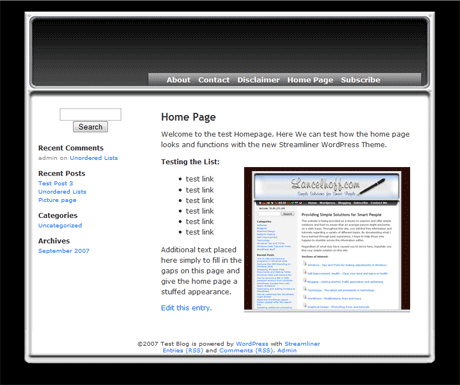
Streamliner WordPress Template Theme

Streamliner Installation Process:

  1. Download the WordPress Streamliner Theme (This Theme is no longer supported)
  2. Run the self extracting 7z archive, extracting the contents of the Streamliner.zip to your computer (you should end up with a Streamliner folder)
  3. Modify the header.png (found in the Streamliner/images folder) adding your own graphics or graphical text to further customize the header
  4. Upload the complete streamliner folder to your template directory Example: wp-content/themes/streamliner
  5. Login to your WordPress admin panel
  6. Click the presentation button in the admin menu bar
  7. Click the themes button in the sub-menu
  8. Select the new theme listed called Streamliner
  9. Click view site and you should now be presented with the new theme.

If you would like a custom header built, feel free to contact me

If you do not yet have a Web Hosting service for your WordPress blog, I highly recommend and personally use BlueHost. You can sign up via the link listed below: