Welcome IP: 189.71.229.241

WordPress How To's Category

WordPress - Set the maximum width of an uploaded image

Saturday, July 5th, 2008

In the following tutorial, I show you how to change the maximum size of an uploaded image in WordPress 2.5 and beyond. By default, when you upload an image in WordPress using the "full size" image option, the image is automatically resized to a maximum width of 500px. This works fine in most cases, for most people. However, if you are using a theme where your post content is utilizing a width larger than 500px, you may want to upload larger images to help maximize the space you have to work with.

Read the rest of this entry

Help - No Static Page Option in WordPress

Tuesday, April 8th, 2008

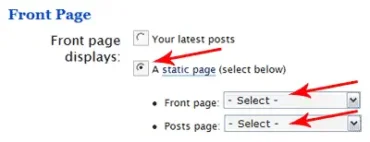
A friend of mine contacted me the other day with the following problem: Help, I can't find the static page option in WordPress. In the newer releases of WordPress, a blogger has the option to make their entry or home page appear as a chronological list of posts (posts page) or as an introductory static page. Using the WordPress static page feature will make your blog present much like a regular website. However, what many don't know is that this option is not automatically available and does not appear by default.

Read the rest of this entry

How to Hide WordPress Categories

Saturday, April 5th, 2008

Hiding WordPress Categories: In the following simple solution, I am going to show you How to keep a selection of WordPress Categories from displaying in your sidebar on your WordPress pages and posts. This is very useful if you have a lot of categories, or have changed the content of your blog, have been indexed for the content and no longer wish to use or display specific categories on your WordPress site. Upon completion of this tutorial, the permalink structure of the hidden categories are still made available to the search engines, however, the categories you have chosen to hide are no longer displayed on your blog to the visitor.

Read the rest of this entry

How to make WordPress Permalinks work in Xampp

Friday, April 4th, 2008

Xampp and similar localhost webservers that can be run from a local computer do not have mod_rewrite enabled by default. Furthermore, the AllowOverride directive is usually set to none, causing Apache to ignore an .htaccess file. If this is the case, your WordPress installation might return a 404 error, stating post not found and you would only be able to access your posts via a default permalink structure. I.E. http://localhost/?p=2. In the following simple solution, I show you how to make WordPress Permalinks work in Xampp and other localhost server installations. Upon completion, you will also have the ability to use .htaccess files on your local server.

Read the rest of this entry

How to Remove Comments Off text from Category List

Monday, March 10th, 2008

In the following simple tutorial, I'll cover the process of removing the Comments Off text from all of your WordPress Category/Archive lists. A WordPress Blogger might want to do this if they have disabled comments globally and no longer need to display information related to Comments. If you need to Globally disable WordPress comments see this post.

Read the rest of this entry

Ultimate Tag Warrior replacement for WordPress 2.5

Thursday, February 7th, 2008

Like most WordPress bloggers, you probably like to keep your WordPress up to date. However, when there are major changes done to the WordPress core, some plugins may fail to work as they used to. Such is the case with WordPress 2.3-2.5 series upgrade and Ultimate Tag Warrior. Those that were using Ultimate Tag Warrior, prior to WordPress 2.3 are likely to face some problems when performing a WordPress upgrade. This is mainly due to the fact that WordPress 2.3 and beyond includes it's own tagging structure.

Read the rest of this entry

Using .htaccess to redirect underscores to dashes

Monday, February 4th, 2008

The following tutorial explains how to use .htaccess to redirect underscores _ in a tag url to dashes -. This is very important for Search Engine Optimization (SEO) because many search engines including Google do not recognize underscores as spaces between words. They do however, recognize dashes to separate words and tag keyword phrases.

Read the rest of this entry

Changing tags from underscores to dashes for SEO

Monday, February 4th, 2008

The following tutorial covers the process of quickly and easily changing or converting your WordPress Tags from using an underscore _ to a dash - for search engine optimization. Google and other search engines do not recognize an underscore _ as a space and therefore will merge multiple keyword phrases into a singular word which is not what you want for Search Engine Optimization (SEO) of your keyword tag phrases. To fix this we can use a dash which is a space recognizable character.

If you have migrated from Ultimate Tag Warrior to Simple Tags, this tutorial is for you.

Read the rest of this entry

WordPress - Show more than 15 recent posts

Tuesday, November 20th, 2007

This tutorial explains how to modify the WordPress recent posts sidebar widget entry to display more than 15 recent posts. By default the number of posts to show is (at most 15). Maybe you want to display 20 recent posts? Or more? I'll show you how.

Read the rest of this entry

How to make a WordPress Page or Post use a different sidebar

Wednesday, October 3rd, 2007

How to add a second sidebar widget for use on separate pages or posts: The following tutorial covers the process of building a second widget compatible sidebar that can be used on specific pages or posts. Using a different WordPress sidebar for pages and posts allows the user to display different sidebar content on a given post or page. In addition, the user could add the duplicate sidebar widgets plugin to add the same widget content to both sidebars.

Read the rest of this entry

Tag options for WordPress 2.3

Wednesday, September 26th, 2007

Starting with version 2.3, WordPress now includes the option to add tags to your posts. This included function works similar to the all popular UTW Ultimate Tag Warrior tag plugin with the exception that it's already pre-configured and included with WordPress 2.3. In the following tutorial, I'll cover how to benefit from the new WordPress 2.3 tagging option by adding the tags to your custom template. Note: if your looking for an All-In-One solution, my streamliner template includes the tagging option and is compatible with WordPress 2.3 as well.

Read the rest of this entry

Optimizing and adding Kontera to WordPress

Tuesday, September 11th, 2007

With the recent introduction of Kontera in text link advertising, many WordPress bloggers have been switching to or adding the new service. Kontera is a publishers advertising system based solely on contextually relevant in text keywords that are discovered in real time on a web site. These keywords are then automatically turned into links to the most relevant ads found within the Kontera network of advertisers.

Read the rest of this entry

How to customize the WordPress Login Screen

Monday, September 10th, 2007

The following tutorial is for those of you who want to customize and further beautify the WordPress Login Screen tailoring it to your sites look and feel. You might want to do this if you have a lot of registered members and don't want them to get bored with the default Login Screen. If you are a blogger who has many different WordPress blogs, customization can help differentiate your site from your other sites, making it easier to keep track of which site your logging into. Changing the Logo or image on the WordPress Login and Registration Screen is not very complicated and really only requires that you edit two image files. The rest of the information can be edited from the wp-login.php file.

The following tutorial has been tested with WordPress 2.2. Earlier versions may vary.

Read the rest of this entry

Make the WordPress search button appear after the search box

Friday, September 7th, 2007

The following tutorial explains how to make the WordPress search button appear after the search box in your sidebar. If your like me, you'd probably rather have the search button next to the search box rather than under the search box. However, by default, the sidebar widget employs a break between the search form and search button. This is relatively easy to fix as I explain below.

Read the rest of this entry

How to add Related Posts to WordPress

Wednesday, September 5th, 2007

The following tutorial illustrates how to add Related Post entries to your WordPress blog. This is done in conjunction with the Ultimate Tag Warrior plugin. If you aren't already using Ultimate tag warrior, I highly recommend adding it to your plugin list. There are so many awesome advanced features this plugin has to offer other than just displaying plain keyword tags. Anyhow, on with how to add Keyword Related Posts to your WordPress entries.

Read the rest of this entry

Problems with post text after upgrading to WordPress 2.2

Thursday, August 30th, 2007

WordPress bloggers that have recently upgraded to WordPress version 2.2 may encounter strange character set or charset encoding problems where apostrophes, hyphens, quotation marks and dashes appear or are displayed in posts and pages as strange characters like ’, �., or even as simple ? (question marks). The symptom is obvious, your WordPress posts or pages will contains garbled, weird and funny characters, sometime just lots of ????? (question marks), rendering the WordPress database with your hard work useless and output unreadable. For many bloggers this problem can quickly become very frustrating. But before you revert back to an earlier version or wipe out and reinstall your database please read ahead as the solution is not so complicated.

Read the rest of this entry

How to manually upgrade WordPress

Thursday, August 30th, 2007

The following tutorial explains how to quickly upgrade WordPress to a newer version. The process is fairly straightforward and simple, however, I have frequently caught people including myself being lazy on an upgrade skipping important steps of the process. I feel it's important to perform a manual WordPress upgrade and not auto upgrade using a utility like fantastico. While fantastico is an awesome tool for installing web applications, it has it's flaws when performing upgrades. It's better to avoid the potential headache.

Read the rest of this entry

Removing the limit of posts per page

Wednesday, August 29th, 2007

Removing the WordPress post per page limit: By default, WordPress posts are limited based on the posts_per_page setting. Making many of your older posts incredibly hard to find for both search engines and readers. Like many readers, I hate (pagination) having to read through pages of posts in a category one page at a time. So I decided to find a way to make every post within any given category show up on a single category page eliminating the need to flip through pages. In the following tutorial, I'll explain how this is accomplished.

Read the rest of this entry

Removing the WordPress sidebar bullets

Wednesday, August 29th, 2007

Remove bullets from the WordPress sidebar: The following tutorial is for those who use the default Kubrick WordPress theme or a derivative of it and want to remove the sidebar bullets to make for a cleaner looking blog. The bullets normally don't appear if your using the Internet Explorer browser and although some people prefer the bulleted sidebar look, I tend to remove it on all sites I have helped develop.

Read the rest of this entry

WordPress Firefox and Position: Relative CSS problems

Monday, August 27th, 2007

When creating or editing the content of a WordPress Cascading Style Sheet (CSS), many people neglect to take the time to check their work using multiple browsers, IE. Opera, Firefox, Internet Explorer, Navigator etc. Unlike Internet Explorer and many of the other popular browsers, Firefox is one of the only browsers that properly use some commonly implemented CSS property values. This can propose a problem when viewing your work with multiple browsers.

Read the rest of this entry

WordPress broken by Plugin

Monday, August 20th, 2007

At some point in time, nearly every WordPress Blogger will experience a broken WordPress blog due to the recent activation of a non compatible plugin. A broken plugin can wreak all sorts of havoc on a WordPress blog including the inability to access the WordPress administration panel. In most cases, when a blog breaks, the fix is fairly simple.

The following tutorial outlines a few WordPress quick fixes for a blogger to try when encountering the almost inevitable incompatible WordPress plugin problem that is causing site errors or limited blog access.

Read the rest of this entry

How to add an Ultimate Tag Warrior Tag Cloud

Friday, August 17th, 2007

The Ultimate Tag Warrior is an awesome plugin for WordPress that allows a Blog author to add keyword tags to your WordPress posts and pages. UTW is relatively simple to install and use, but contains many advanced features that the user can customize as well. For example, tag clouds (one of the most popular keyword organizing methods) are often used on some of the highest ranking sites. The following tutorial explains how to add a custom tag cloud to WordPress in the footer section.

Note: As of WordPress 2.3 and beyond, this tutorial is obsolete.

Read the rest of this entry

What is a trackback and why how to use them

Thursday, August 16th, 2007

A TrackBack is a mechanism used for communication between blogs: if a blogger writes a new entry commenting on, or referring to, an entry found at another blog, and both blogging tools support the TrackBack protocol, then the commenting blogger can notify the other blog with a "TrackBack Ping"; the receiving blog will typically display summaries of, and links to, all the commenting entries below the original entry. This allows for conversations spanning several blogs that readers can easily follow. - Information quoted from the WIKI

Read the rest of this entry

New Post does not show up for some people

Thursday, August 16th, 2007

New WordPress Post is not showing up or displaying for some people: I get this question quite frequently and in almost every case, the Post is flagged as Private. The reason most bloggers think it has been posted and is viewable to the public is because private posts are viewable to those that are logged in with administration access rights and typically after a blogger writes and publishes a post, they go View site without logging out. So, the post shows up for them as the browse the site.

Read the rest of this entry

WordPress - How to change the more tag text

Thursday, August 16th, 2007

As a WordPress user, you may have noticed that you can insert a more tag to your posts so that only the text before this tag appears on the archive or category pages. By using the more tag, more post entries can appear on each page while still utilizing an introductory paragraph for each post. Then, when a visitor clicks on the more tag, they are sent to the full post where they can continue to read the article. However, the default WordPress more tag simply says (more…). In the following article, I explain how to change the more tag text to a text that is more meaningful like "click here to read on!"
Read the rest of this entry

Automate WordPress Post Publishing with Post Timestamp

Tuesday, August 14th, 2007

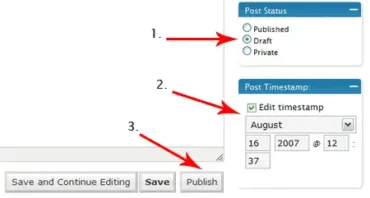
Automate WordPress Post Publishing: There are the many features WordPress Bloggers rarely take advantage of. One such feature is Post Timestamp. I typically use this feature when I plan to go on vacation, during holidays or when I know I will be busy with other things. The Post Timestamp settings allow me to set a drafted post to be published at a future date (let's the post go live in the future) while I am away from the computer. The following simple tutorial explains how this is accomplished.

Read the rest of this entry

How to Turn off trackbacks and pingbacks

Monday, August 13th, 2007

The following article explains how to turn off WordPress trackbacks and pingbacks. In most cases, a WordPress Blog author might decide to disable comments if they are getting an overwhelming amount of spam. However, sometimes the spam can still get through in the form of trackbacks or pingbacks, enabling an abusive user to spam links as comments on the affected blog. Luckily this feature can be easily turned off and or totally eliminated entirely from your WordPress blog in just a few steps.

Read the rest of this entry

WordPress with both Static Home and latest Blog Posts Pages

Tuesday, July 17th, 2007

This article explains how to run a static front or home page while still resuming the chronological blog posts on another page. This basically allows a user to have both a Website and chronological Blog of the same content. For example if you write a page titled blog, it would be accessible separately at www.yoursite.com/blog. This article assumes that you've already set your site to use a static front page using WordPress.

Read the rest of this entry

Making a WordPress post template

Monday, June 18th, 2007

Do you publish WordPress posts on a regular basis which use the same structure? Maybe you have a signature or picture you would like to add to every post? You can eliminate the time spent going back and forth between posts doing copy and paste functions by simply creating a post template. A post template can automatically add text, images or code to every new post you create. Currently, I don't use a WordPress post template on this site. However, I have set it up for others who use specific images and signatures that need to be added to the content of every post.

Read the rest of this entry

Customizing the WordPress WYSIWYG TinyMCE visual editor

Monday, June 18th, 2007

Adding addtional buttons or tools to WordPress WYSIWYG TinyMCE visual editor: Like most people, you probably enjoy using the built in TinyMCE visual editor that is included with WordPress. However, by default the included WYSIWYG editor lacks some essential tools like font color, font size, font family and more. The good news is that most of these tools are already included in WordPress but are simply not active. The following tutorial shows you how to add additional buttons to include these tools to your WordPress visual editor.

Read the rest of this entry

Add a button to change font color in WYSIWYG

Monday, June 18th, 2007

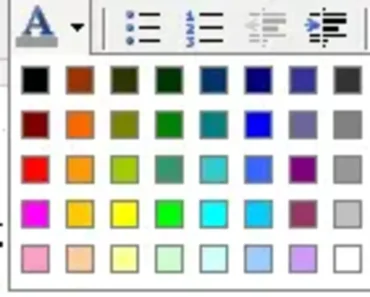
By default the WordPress WYSIWYG editor is pretty basic. In my opinion, the average WordPress user is probably one that does not know or care to learn a lot about html (they just want to blog). In which case most people that use WordPress are likely to use the WYSIWYG visual editor over the code editor. One important missing element from the visual editor is the ability to select or change font color or text color. The following tutorial explains how to add a nice little font color selection tool to your WordPress WYSIWYG visual editor.

Before:

WYSIWYG Text Editor (default)

After:

New Text Editor (with font color button)

Read the rest of this entry

How to set a WordPress Static Front Page

Saturday, May 26th, 2007

WordPress is perfect to use as a personal blogging platform. But did you know that it can also be used as a complete Web Site replacement? By using the Static Front Page option built into WordPress version 2.1 and later, one can literally turn a Blog into a Website. In addition, the user can still retain the Blog Post structure.

Read the rest of this entry

Enable or Disable WordPress Comments on all posts in one step

Wednesday, February 21st, 2007

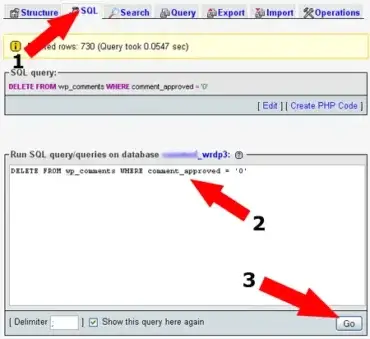
With WordPress, you can globally disable comments, if you do not want to allow comments to be placed on your blog. Since this information is stored in the database, we can edit the allow comments option (open or close comments) across the entire blog in one step. This tutorial explains how to remove all instances of Allow Comments by using an SQL database query.

Read the rest of this entry

Remove Comments are Closed text from posts

Wednesday, February 21st, 2007

I can't recall how many times I have been asked by numerous people how to remove the "Comments are Closed" text from the bottom of WordPress posts. So, I have decided to write a quick tutorial on the subject. The following tutorial explains how to remove the Comment option and Comments are Closed text from being made available on your posts.

Read the rest of this entry

Adding a banner to a single page in WordPress

Wednesday, February 21st, 2007

This tutorial explains how to add a banner to a single page or set of pages in WordPress. This is particularly useful for those that have the desire to display a specific banner on a per page basis. For example, you might want one page to present a banner but do not want the banner to appear on your whole site. This can easily be accomplished in just a few steps, so let's get started.

Read the rest of this entry

WP e-Commerce shipping to USA and Canada only

Saturday, February 10th, 2007

After installing the WordPress e-Commerce shopping cart Plugin, I had to do some modifications to the cart in order to get it to work the way I wanted. One of those modifications has to do with shipping. I think most people would agree that when your doing small business online, you don't want to ship to far reaches of the planet. You probably want to keep your customers localized making it easier to do business without too much risk. In the following tutorial, we will cover the process of setting exactly which Countries you want to ship to and remove the ones you don't. So let's get started.

Read the rest of this entry

How to easily add AdSense to your WordPress posts

Thursday, February 8th, 2007

Manually adding AdSense to WordPress posts is a relatively simple task that can be accomplished within just a couple of minutes. In this tutorial, we cover the process of adding the code to the singlepost.php. This will allow us to display advertisements on every post only when the post is individually viewed. There are many places within the singlepost.php to add the code, for the sake of simplicity, we are going to cover the hotspot.
Read the rest of this entry

Add a Firefox Referral Ribbon Banner to WordPress

Friday, February 2nd, 2007

This tutorial covers the process of adding a Firefox referral ribbon banner to your WordPress site. If you are a Google Adsense publisher, you might be wondering how to make better use of the Adsense Firefox referral program and make a little more money by spreading the use of Firefox. If you have a site and are not yet participating in the Google advertising network, feel free to
Through personal experience, I have found the best way to give people the opportunity to try Firefox is to make the advertisement stand out. What better way to do this than to add the header to the top of the page?

Example Firefox Banner Screenshot:

Firefox Referral Ribbon Banner

Read the rest of this entry

Display Adsense Search Results Within WordPress Pages

Wednesday, January 31st, 2007

Put Google adsense search results in WordPress: The results from an adsense search are by default, displayed on a google landing page. Google allows Website publishers to display these search results on their own landing page. In this tutorial, I explain this process step by step using WordPress.
Read the rest of this entry

Move the Kubrick Sidebar to the left

Wednesday, January 31st, 2007

Moving the Kubrick sidebar to the left side: The default Kubrick template that comes with WordPress is great straight out of the box. However, some people prefer to have their pages and posts laid out differently. One change I've seen many wish to implement is a left sidebar. By default, the sidebar is located on the right side of the page rather than the left. The following tutorial explains how to easily move the sidebar from right to left.

Read the rest of this entry

WordPress 2.1 released

Monday, January 22nd, 2007

WordPress 2.1 (codename "Ella") has just been released from WordPress.org, providing many key improvements. This release symbolizes a major landmark in blogging software development. It looks like it might be time for us to do an upgrade. Just a few of the awesome improvements are listed below:

Read the rest of this entry

Add a navigation menu to WordPress

Wednesday, October 18th, 2006

This tutorial will explain how to add a simple Horizontal Navigation Menu to WordPress. The navigation menu or bar will allow your visitors to obtain easy access to your site and all of it's content directly from the top of each page or post.
Nav Menu Screenshot

Read the rest of this entry

Another great black WordPress theme

Monday, October 16th, 2006

If your into the dark themes, you might want to check out the ________ site. The base theme template used on the _________ site is available for download. It uses a lot of the same features found with the lancelhoff template and then goes on to add a nice clean 3D touch with the windowed header.

Click the image below to go there:

It appears that the site is no longer.

WordPress - How to make the sidebar show in posts and pages

Saturday, June 10th, 2006

I've always enjoyed using WordPress blogging software from the day I first installed it. It's simple to work with, is well structured and contains an easy to navigate admin menu. Wordpress includes a default template called Kubrick that contains a great simple base design to work with.

Read the rest of this entry

How to fix the WordPress word spacing problem

Tuesday, June 6th, 2006

When I first installed WordPress blogging software, I was impressed and thought to myself, this is much better than most of the previous open source blogging software I've used.

As I started to become more familiar with wordpress, I began to find some small bugs and quirks. Most of these bugs and quirks were fixed with simple update versions of wordpress and third party plugins. But there was one bug in particular that was becoming very annoying.

Read the rest of this entry