How to Boot and Run DOS from USB. Make a DOS Bootable flash drive. In the following simple solution, I show you a simple way to Put DOS on a USB flash drive or other removable device. We will be using a nifty little tool called RUFUS (Reliable USB Format Utility), created by Pete Batard.
This tool closely resembles the old HP USB format tool. It also includes some of the same key features, and really makes it easy to Create a DOS Bootable USB Key.
Create a DOS Bootable USB - Run DOS from USB
- Download and start Rufus.
- (A) First choose your Flash Drive under Device.
(B) Then select FAT32 for the File system.
(C) Tick Create a DOS bootable disk.
* You can choose WinMe DOS or FreeDOS.
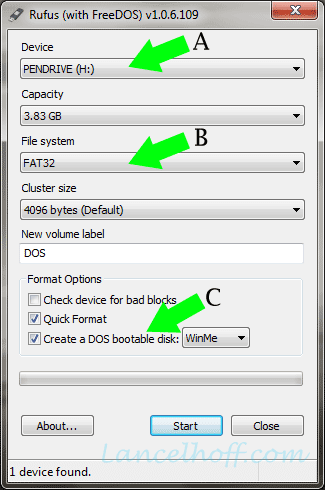
- Click Start to put DOS on your USB device.
- Once finished, you'll want to restart your PC. Then set your system BIOS or Boot Menu to boot from the USB drive. And then finally reboot again. Enjoy!