
Switching Between Graphics Cards on a MacBook Pro: Some older MacBook Pro models include dual graphics cards: a lower power nVidia 9400M for battery efficiency and a higher performance nVidia 9600M GT for demanding graphics tasks. By default, macOS favors the 9400M to conserve battery life, but you can manually switch to the 9600M GT when maximum performance is needed.
This guide walks through the exact steps to switch graphics cards on supported MacBook Pro models.
How to Switch Graphics Cards on a MacBook Pro
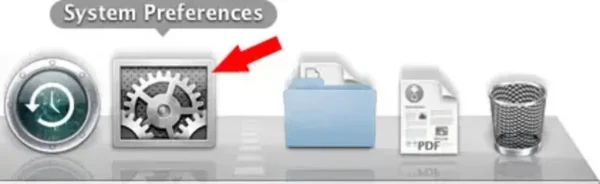
- Click the System Preferences icon from your MacBook Dock.
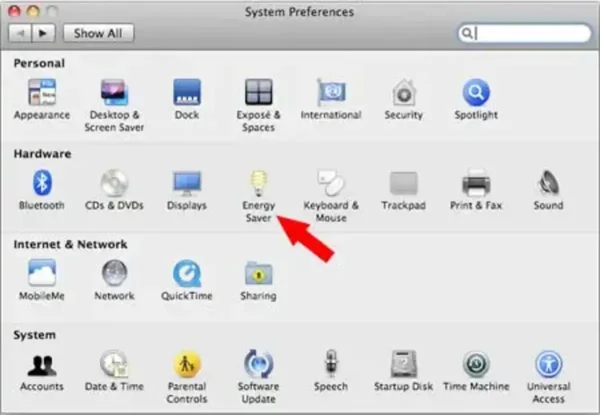
- Select Energy Saver from the System Preferences window.
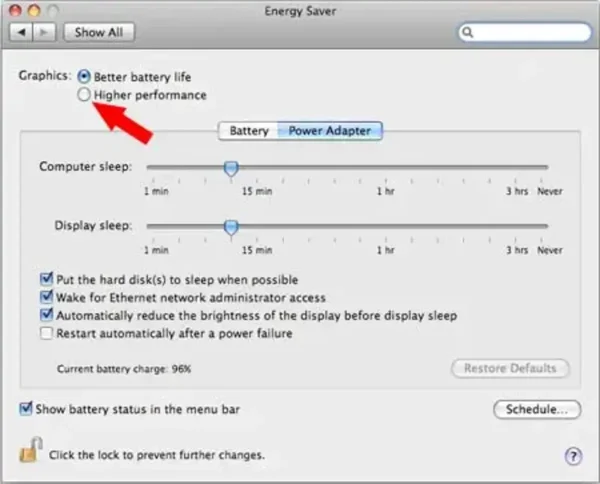
- Check Higher Performance Graphics to enable the nVidia 9600M GT.
- When prompted, click Log Out to apply the new graphics settings.
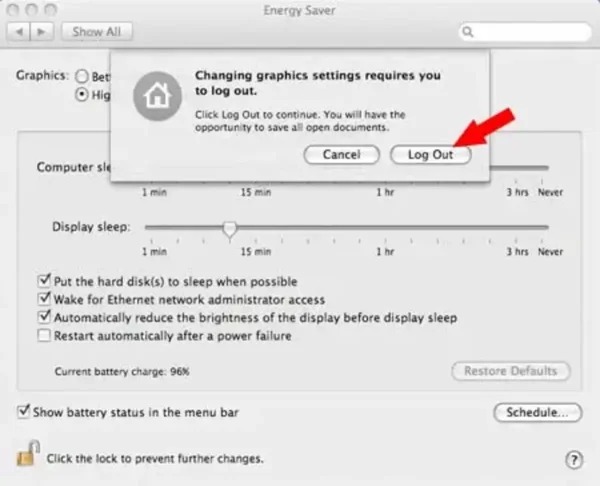
After logging back in, your MacBook Pro will be using the nVidia 9600M GT for maximum graphics performance.
To switch back to the nVidia 9400M for improved battery life, repeat the same steps and select Better Battery Life instead.
Important Notes
- If you run Windows using Boot Camp, the nVidia 9600M GT is used by default. Apple did not provide drivers to manually switch between GPUs in Windows at the time.
- This guide applies only to older Intel based MacBook Pro models with dual nVidia graphics cards.
- Modern MacBook Pro systems with Apple Silicon use automatic graphics management and do not offer manual GPU switching.
Final Thoughts
Manually switching graphics cards on supported MacBook Pro models lets you choose between maximum performance and extended battery life. While modern Macs handle this automatically, understanding how older systems work can still be useful for legacy hardware, troubleshooting, or performance tuning.
Related searches: MacBook Pro switch graphics cards, enable 9600M GT MacBook, MacBook dual graphics settings, MacBook performance vs battery graphics, nVidia 9400M 9600M switch Mac