
Do you want to change the excerpt length in WordPress? Whether you want to show more or less content in your post previews, it's easy to customize the the_excerpt() function. In this tutorial, you'll learn how to increase or decrease the WordPress excerpt length by editing your theme's functions.php file.
What is a WordPress Excerpt?
A WordPress excerpt is a shortened version of your post content, often used in archive pages, search results, and widgets. By default, WordPress shows the first 55 words of your post. But what if you want more control?
Why Change the WordPress Excerpt Length?
Adjusting the excerpt length lets you control how much content readers see before clicking through. A shorter excerpt can keep pages concise, while a longer one provides more context. It's especially useful for news, tutorials, or magazine-style blogs.
How to Change the Excerpt Length in WordPress
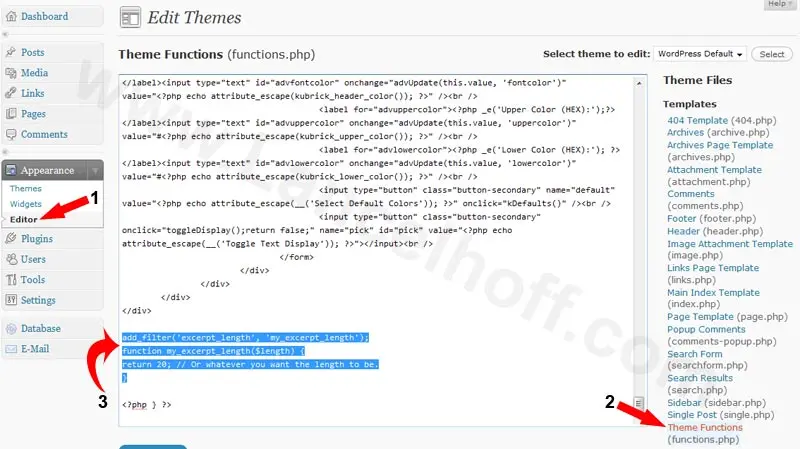
- Login to the WordPress admin dashboard.
- Go to Appearance > Theme File Editor.
- Open the functions.php file from your active theme.
- Add the following code just before the closing
?>tag (if it exists):
add_filter('excerpt_length', 'custom_excerpt_length');
function custom_excerpt_length($length) {
    return 20; // Change this number to your desired excerpt length
}- Update the file, then refresh your site to see the new excerpt length in action.
(Click the screenshot below for a visual guide)
Customize WordPress Excerpt Length Per Post Type
If you want to set different excerpt lengths for pages, posts, or custom post types, use conditional logic inside your function.
function custom_excerpt_length($length) {
    if (is_post_type_archive('news')) {
        return 40;
    }
    return 20;
}
add_filter('excerpt_length', 'custom_excerpt_length');
How to Add "Read More" Links to WordPress Excerpts
By default, WordPress excerpts do not include a "Read More" link. However, you can customize this behavior by modifying the excerpt_more filter in your theme's functions.php file.
Here's how to add a clickable "Read More" link at the end of your excerpts:
function custom_excerpt_more($more) {
    return '... <a href="' . get_permalink() . '">Read More</a>';
}
add_filter('excerpt_more', 'custom_excerpt_more');- Go to Appearance > Theme File Editor.
- Open your active theme's
functions.phpfile. - Paste the code above anywhere before the closing
?>tag (if it exists). - Click Update File.
- Preview your site, your excerpts will now include a "Read More" link pointing to the full post.
This simple change not only improves user experience but also increases the chances that visitors will explore more of your content.
Final Thoughts
That's it! You've now successfully changed the WordPress excerpt length to match your content strategy. Whether you want to offer readers a brief snippet or a detailed preview, this tweak gives you full control over how your posts are displayed.
Was this helpful? Feel free to check out my other WordPress How to tutorials.