
Looking to block AdSense ads in Opera without installing extensions or plugins? The Opera Web Browser offers a built-in way to block Google AdSense advertisements using its advanced content blocking settings. This lightweight and effective method allows you to remove intrusive ads, including those served by Google, and enjoy a cleaner, faster web browsing experience. In this guide, you'll learn how to disable ads in Opera without any third-party software.
Why Block Google AdSense Ads in Opera?
AdSense ads can be distracting, slow down your browsing, and track your behavior across websites. While Firefox and Chrome often require ad blocker extensions like uBlock Origin or AdBlock Plus, Opera includes native ad blocking tools that give you more control over what gets displayed. This makes Opera a smart choice for privacy conscious users or those simply looking to speed up their browsing by eliminating unnecessary ads.
How to Block AdSense Ads with Opera Browser
Follow these simple steps to manually block Google AdSense content using Opera's built-in tools:
- Open Opera Browser. Launch the Opera application on your desktop or laptop.
- Navigate to the content blocking settings.
Go to the main Menu > Tools > Advanced > Blocked Content.
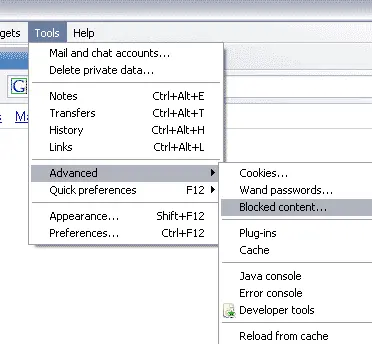
- Add a URL pattern to block Google AdSense Ads.
In the "Blocked content" window, click Add and enter the following URL pattern:
http://pagead2.googlesyndication.com/*
This pattern blocks all elements served from Google's ad servers. - Click "Close" to save and apply your changes.
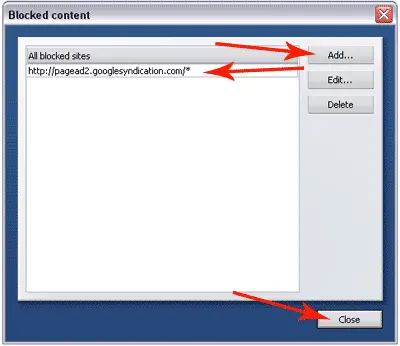
Enjoy an Ad-Free Experience with Opera
That's it! You've now successfully blocked Google AdSense ads in Opera. No need for external ad blockers, this method is simple, fast, and built right into your browser. It helps reduce page clutter, improves load times, and enhances your overall browsing experience.
Advanced Tip:
Want to block more than just AdSense? You can add additional URL patterns for other ad servers using the same method. For example:
https://*.doubleclick.net/*https://*.googletagservices.com/*https://*.googleadservices.com/*
Just add them to your blocked content list for broader ad suppression.
Frequently Asked Questions
Can I block Google AdSense ads in Opera without using extensions?
Yes, Opera allows you to block Google AdSense ads natively. You can do this by adding specific URLs to the built-in content blocker in advanced settings, no extensions or add-ons required.
What URL should I block to remove AdSense ads?
You need to block http://pagead2.googlesyndication.com/*. This URL pattern is responsible for delivering most AdSense ads. Adding it to the blocked content list effectively disables those ads in Opera.
Will blocking AdSense ads break websites?
Not usually. Most websites will continue functioning normally. However, you may notice empty ad placeholders or slight layout shifts where ads would normally appear.
Can I block AdSense ads using Opera on mobile?
Opera's mobile version includes a basic ad blocker, but it doesn't support manual URL filtering like the desktop version. For precise blocking like this tutorial outlines, use Opera on a desktop.
Disable Ads in Opera - Final Thoughts
Opera makes it easy to take control of your web experience. By using its built in advanced preferences, you can block ads in Opera without plugins, giving you faster browsing speeds and a more private internet session. Whether you're annoyed by ads or just want a cleaner interface, this guide provides a straightforward way to achieve it, no extensions required.
Related: How to Block Google AdSense Ads in Other Browsers
browsing with your Ad-Free Opera Browser.