
This tutorial covers the process of adding a Firefox referral ribbon banner to your WordPress site. If you are a Google Adsense publisher, you might be wondering how to make better use of the Adsense Firefox referral program and make a little more money by spreading the use of Firefox. Through personal experience, I have found the best way to give people the opportunity to try Firefox is to make the advertisement stand out. What better way to do this than to add the header to the top of the page?
🦊 How to Add a Firefox Ribbon Banner to Your WordPress Site
Note: The Google AdSense Firefox referral program has been discontinued. This tutorial is preserved for historical and educational purposes only. You can still use a banner to promote Firefox or for custom linking.
Example: Firefox Ribbon Banner
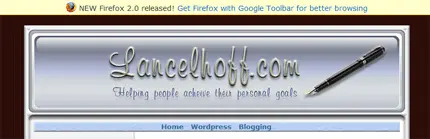
Tutorial: Adding a Ribbon Banner in WordPress
🔹 Step 1: (Historical Reference)
This step originally involved creating a Firefox referral ad from AdSense. Since the program no longer exists, you can skip this or replace it with a modern affiliate or promotional banner linking to https://www.mozilla.org/firefox/.
🔹 Step 2: Edit Your Theme Header
- Log in to your WordPress dashboard.
- Go to Appearance → Theme File Editor
- Select header.php from the list of theme files.
- Find the opening
<body>tag. - Directly below the
<body>tag, paste the following code:
<!-- Banner Section Start -->
<!--[if IE]>
<div style="
background-color: #FFFFCC;
border-bottom: 1px solid #FC0;
margin: 0 0 5px 0;
padding: 4px 0;
font-size: 14px;
text-align: center;">
<img src="https://lancelhoff.com/images/fflogo.webp" alt="Firefox" style="vertical-align: middle; margin-right: 8px;" />
This site is best viewed with <a href="https://www.mozilla.org/firefox/" target="_blank">Firefox</a>!
</div>
<![endif]-->
<!-- Banner Section End -->
🔹 Step 3: Save and View Your Site
Click Update File and refresh your site to see the banner displayed at the top of the page.
Modern Uses
Even though the referral program has ended, you can repurpose this method to:
- Promote Firefox or other open-source tools
- Create affiliate banner placements
- Show custom notifications to specific users
For easier banner management, consider plugins like WP Notification Bars, Simple Banner, or WPFront Notification Bar.